
How Much A Website Costs in NZ: 2026 Website Pricing Breakdown
.jpg)
Website cost in NZ summary:
The cost of a website in New Zealand varies depending on complexity and customisation; these are the average costs for websites in 2026:
- The costs of a basic brochure with 1-5 pages range from $1,000 to $4,000,
- The cost of a simple website, 5-20 pages, can range from $3,000 to $12,000.
- The cost of a complex website with more than 20 pages, advanced CMS features, and automation ranges from $10,000 to upwards of $80,000
- E-commerce websites start at $3,000 and can reach upwards of $50,000.
How much does a website cost in New Zealand?
Website packages vary in cost and quality depending on the experience of the web design agency and your business requirements.
Here is a breakdown of website costs based on the type of business and website.
Four things affect the cost of a website in NZ
1. Design
Websites requiring unique designs, custom graphics, or bespoke branding will be more expensive than those using pre-designed templates.
2. Build/Development
The more complex the site, the higher the cost. A site with advanced features such as e-commerce, custom integrations, or database management will typically cost more than a simple brochure site.
3. Content
The amount and type of content needed can affect the cost. A website requiring extensive high-quality content—such as product descriptions, blog posts, or videos—will cost more to produce.
4. Maintenance
Consider the long-term requirements when assessing overall cost. Factor in how complex the website will be to maintain and any ongoing annual costs you'll need to budget for.
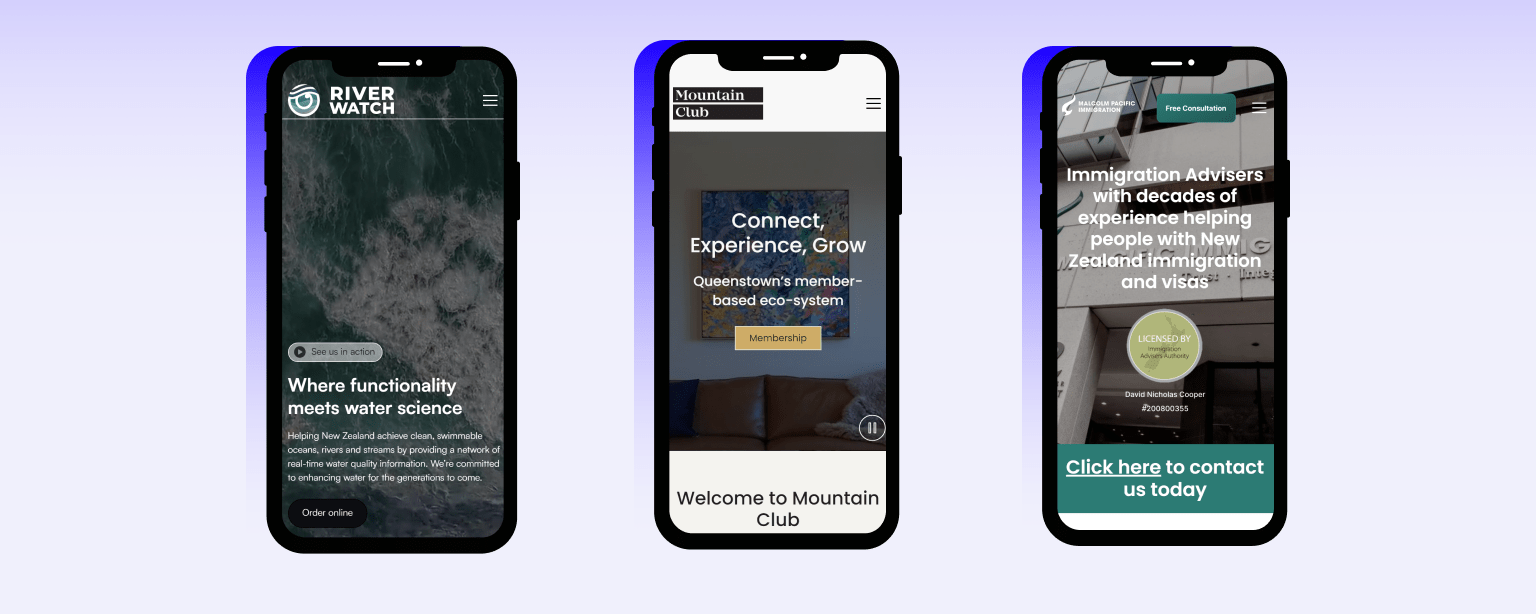
A few websites we have made
Why comparing website quotes matters
Choosing the right web design partner is one of the most important decisions you'll make for your online presence. It's tempting to focus solely on price, but the cheapest option often costs more in the long run.
A poorly built website can damage your brand, frustrate visitors, and require expensive fixes. By comparing agencies, freelancers, and DIY platforms across multiple factors—expertise, value, communication, and ongoing support, you'll find a partner who truly understands your goals.
Taking time to evaluate your options now will save you headaches, hidden costs, and wasted time later.
What are the standard features that a new website build will have?
Choosing the right professional website agency will also mean hiring a well-rounded team of experts in website design, graphic design, website development, digital marketing, and other essential skills. These skills are necessary to create a tailored website to meet your business needs.
When you choose a professional website designer, you should expect the following standard features for the estimated cost:
- Customised website design to suit your unique needs (no templates)
- Search Engine optimised and AEO site structure
- A Content Management System
- Features such as contact forms, slideshows, and social media links
- Responsive web design to ensure your website functions seamlessly on mobile devices
- Optimised coding for faster website loading speeds
What add-ons can increase the cost of a website build in NZ?
Aside from the basic website components, additional features may be necessary, which can raise the overall cost of your website. Below are some examples:
- Extra pages
- Conversion rate optimisation
- Animations
- Blog configuration
- Integrations
Website agency comparison criteria
When evaluating providers, use these criteria to make fair comparisons:
- Portfolio and experience – Do they have relevant work in your industry?
- Range of services – Do they offer design, development, SEO, and content, or just one piece?
- Communication style – How do they manage projects and keep you informed?
- Pricing transparency – Are quotes itemised and clear about what's included?
- Post-launch support – What happens after the site goes live?
- Ownership and access – Will you own your website and have full access to make future changes?
The Importance of a clear, itemised proposal when building a website
A detailed proposal protects both you and your provider. Request a proposal that clearly outlines:
- Number of pages included
- Features and integrations (forms, booking systems, e-commerce)
- Content creation responsibilities—who writes and provides it?
- SEO setup—is it included or charged separately?
- Hosting, domain, SSL, and plugin costs
- Revision policy—how many rounds are included, and what counts as a revision?
- Payment structure and milestones
Vague quotes lead to scope creep, unexpected invoices, and frustration. A transparent proposal ensures everyone is aligned from the start.
Website Cost Red Flags and Green Flags
Red flags:
- Vague or overly simple quotes with no breakdown
- Reluctance to explain their process or answer questions
- Hidden fees that appear mid-project
- No clear timeline or milestones
- Pressure to sign quickly without reviewing details
Green flags:
- Itemised quotes with clear inclusions and exclusions
- Willingness to walk you through every stage
- Documented processes and timelines
- Open communication and regular updates
- References or case studies readily available
Trust your instincts—if something feels unclear or rushed, ask more questions before committing.
Questions to ask about a website's cost
Before signing with any provider, ask these questions to the web agency:
- What's included in your quote, and what's not?
- How do you handle ongoing support and updates after launch?
- Who owns the website once it's complete?
- Are there recurring fees for plugins, hosting, or services?
- Can you provide references or case studies from similar projects?
- What's your revision policy?
- How do you handle delays or scope changes?
If you want to go into more details, ask them these questions:
Overview of the Process
Questions to ask:
- Can you walk me through your website design process?
- Do you follow a structured workflow for every project?
Key points:
- A clear, structured process reduces misunderstandings and delays
- It ensures nothing is missed and sets expectations from the start
- Ask for documentation or a visual overview of their workflow
Normal Steps In a Website Build
Questions to ask:
- What stages does your process include?
- What happens at each stage, and what can I expect?
Key points:
- Discovery & Strategy – Initial meetings to understand your goals, audience, and outcomes
- Scope & Proposal – Defining requirements, features, pages, timelines, and costs
- Wireframing & Planning – Mapping site structure, navigation, and user flow
- Design – Developing visual style, branding, and layouts with client feedback
- Content Collection or Creation – Gathering or producing text, images, and videos
- Development/Build – Coding the site and integrating features
- Testing & Quality Assurance – Checking for bugs, responsiveness, speed, and accessibility
- Client Review & Revisions – Presenting for feedback and making agreed changes
- Launch – Pushing the site live and connecting domains
- Post-Launch Support – Training, maintenance, and ongoing optimisation
Who's involved at Each Stage of the web build
Questions to ask:
- Who will I be working with throughout the project?
- Will I have a dedicated point of contact?
- Who handles design, development, and content?
Key points:
- Typical roles include project manager, designer, developer, content writer, and client
- Knowing who's responsible for what avoids confusion
- A single point of contact streamlines communication
What's required from you (the client)
Questions to ask:
- What will you need from me, and when?
- What approvals will I need to give at each stage?
Key points:
- Be prepared to provide content, images, branding assets, and login credentials
- Timely feedback and approvals keep the project on track
- Delays on your side can push back the entire timeline
Timeline Expectations
Questions to ask:
- How long will the project take from start to launch?
- What's the typical timeframe for each phase?
- What factors could extend or shorten the timeline?
Key points:
- Most professional website builds take 4–12 weeks, depending on complexity
- Larger projects with custom features or e-commerce will take longer
- Agree on milestones and deadlines upfront
Communication and Updates
Questions to ask:
- How will you keep me updated on progress?
- How often will we have check-ins or meetings?
- Do you use a project management tool I can access?
Key points:
- Regular check-ins, milestone reviews, or project dashboards keep everyone aligned
- Clear communication prevents surprises and keeps the project moving
- Know who to contact and the best way to reach them
Revision Policy
Questions to ask:
- How many rounds of revisions are included?
- What counts as a revision versus a new request?
- What happens if I need more revisions than are included?
Key points:
- Most agencies include a set number of revision rounds at each stage
- Understand what's included to avoid unexpected costs
- Gather feedback internally before submitting to minimise back-and-forth
Launch Checklist
Questions to ask:
- What do you check before the site goes live?
- Will you handle domain setup, SSL, and hosting?
- Is SEO setup and analytics included?
Key points:
- A thorough launch checklist should cover domain connection, SSL certificate, SEO basics, analytics, backups, and final testing
- Confirm who is responsible for each item
- Ensure everything is tested across devices and browsers
Post-Launch Support and Training
Questions to ask:
- What training will I receive on managing my website?
- How do I request changes or fixes after launch?
- What ongoing support packages do you offer?
Key points:
- Training on your CMS ensures you can make basic updates yourself
- Understand what support is included and what costs extra
- Ask about response times and how to report issues
Flexibility and Customisation
Questions to ask:
- Can you tailor your process to my specific needs?
- How does your approach differ for e-commerce versus brochure sites?
- Can the process be adjusted if my requirements change?
Key points:
- A good agency adapts their process for different project types
- Complex projects may require additional stages or specialist input
- Flexibility ensures the process works for you, not against you
The answers will reveal how transparent and professional a provider is—and whether they're the right fit for your project.
Paying for the website build
Working with an agency that staggers its payment based on deliverables or milestones is normal. Most website design companies will divide the cost into three separate instalments. These usually include:
- A deposit of around 50 per cent of the total cost will be requested before work begins.
- Generally, the second payment is due halfway through the development work and amounts to 25% of the total cost.
- The remaining 25% of the cost is usually due upon website completion.
What are the ongoing website cost factors you need to consider?
Talking to potential design partners and understanding the platform best for your website helps facilitate initial design and development decisions. The features you require will aid your decision when considering which platform to use for constructing your website.
With our years of experience working with many platforms, we recommend Shopify for e-commerce and Webflow for brochure and CMS Sites. This is based on cost and quality factors as well as the ease of maintenance for our customers.
Cost factors in choosing the right web platform.
- Website Platform & content management system costs: The annual costs of running a website can vary widely depending on many factors, including the size and complexity of the site. Some CMS platforms like Webflow or Shopify charge monthly fees for their services. This fee can range from $10 to $50 per month, depending on the platform and the features you need.
- Integrations or plugins: If your platform needs additional plugins to perform specific functions on your site, this can be a hidden cost you might not factor in. The cost of plugins range from $0 to $100+ a year. It is essential to understand what features each platform has and whether they are suitable for you, and the cost of additional plugins before you choose your platform, as prices can spiral if you are relying on paying multiple subscriptions. Platforms like Webflow have many features already built in.
- Hosting costs: The cost of website hosting platforms can range from a few dollars a month for shared hosting to hundreds or thousands per month for dedicated or cloud hosting. The average cost for hosting a website on a shared server is around $50-$100 per year.
- Ongoing cost for maintenance: Depending on the complexity of your site, you may need to hire a developer to perform maintenance or updates. This can cost anywhere from a few hundred to several thousand dollars annually.
- Development costs (so you know how much you will be charged if you want to make changes). Ask them a question like "What is the average cost to add a new page to the site"? Developer costs can be from $80-$150 per hour, depending on their experience and the complexity of the development.
- Domain costs: Typically, you'll need to pay an annual fee to register your website's domain name, which can range from $10 to $50 per year.
- Security: If you have an online store or collect sensitive information from users, you may need to pay for an SSL certificate to encrypt data. An SSL certificate can cost from $50 to $500 per year.
How to make sure you get a return from your website investment
What Is Website ROI?
Website ROI measures the value your business gains compared to what you've invested. This includes design, development, content, and ongoing maintenance. But ROI isn't just about recouping costs—it's about how effectively your website helps you achieve business goals like generating leads, increasing sales, and improving efficiency.
Why ROI Matters
A website isn't an expense—it's a strategic business asset. A well-built site delivers tangible outcomes: attracting customers, supporting sales, and building credibility. Focusing on ROI ensures your website works hard for your business, delivering measurable results that justify your investment and contribute to long-term growth.
Ways a Website Delivers ROI
Your website can drive returns in several ways:
- Lead generation – Capturing enquiries, bookings, and sales around the clock
- Sales growth – Directly through e-commerce or by generating more opportunities
- Brand credibility – Building trust that converts visitors into customers
- Operational efficiency – Automating bookings, FAQs, and enquiries
- Marketing effectiveness – Supporting SEO, ads, and social campaigns
- Customer support – Reducing repetitive queries and freeing up your team
Metrics to Measure Website ROI
Track these metrics to understand your website's performance:
- Leads or enquiries generated
- Online sales or revenue
- Conversion rates (visitors to leads or sales)
- Website traffic and growth over time
- Cost per acquisition or lead
- Time saved on admin or support
- Customer feedback and satisfaction
Regularly reviewing these helps you see what's working and where to improve.
How to Maximise Website ROI
To get the best return from your website:
- Invest in quality design and user experience
- Ensure your site is SEO-optimised and mobile-friendly
- Keep content relevant and up to date
- Use analytics to track performance and spot trends
- Build for scalability so your site grows with your business
The Long-Term Value of a Good Website
A well-built website is a long-term asset. Unlike marketing campaigns that deliver short-term results, your website generates value year after year—attracting customers, supporting sales, and adapting as your business evolves. Investing in quality upfront pays off in ongoing returns and fewer costly rebuilds.
Real-World Results
Many businesses see measurable improvements after investing in a quality website. One client saw a 40% increase in online enquiries within three months. Another reduced admin time significantly by integrating automated booking. Even small improvements in conversion rates or customer satisfaction add up to significant gains over time.
ROI Pitfalls to Avoid
- Underinvesting in design or functionality – Cutting corners leads to a site that doesn't perform, costing you in lost opportunities
- Not tracking results – Without data, you can't improve or optimise
- Failing to maintain or update – An outdated site reduces effectiveness and damages credibility
- Going for the "cheapest" option - Cheap very rarely means = better. Invest i your website accordingly